A family organizer in your own Claude: the Wrenhouse kits
Family life runs on small facts: who drives on Thursday, which day needs the swimming bag, who replied to the party invitation. Wrenhouse makes kits for exactly that. Each one runs in your own Claude and keeps its data in a folder on your computer.
How the family kits work
You type what you know, in your own words: "Sam works late on Wednesday" or "Lily has swimming at 16:00 on Wednesdays". Claude updates the data files, and the dashboard shows the result.
Every kit has a setup script that asks at most five questions, a dashboard that opens without internet, and fictional sample data you can try first. The kits run on the computer where you set them up. One person keeps them up to date; there is no shared family login.
What using them looks like
Say it is Sunday evening. You open the family folder in the Claude desktop app and type the changes you heard about this week: a dentist appointment on Thursday, a late shift on Tuesday, a party invitation for Saturday afternoon. Claude adds them to the data files. The dashboard then shows the new week, with any clash or open pick-up marked, so you can sort it out with the people involved.
You do not fill in forms or pick dates from menus. If Claude needs a detail, such as who drops off, it asks.
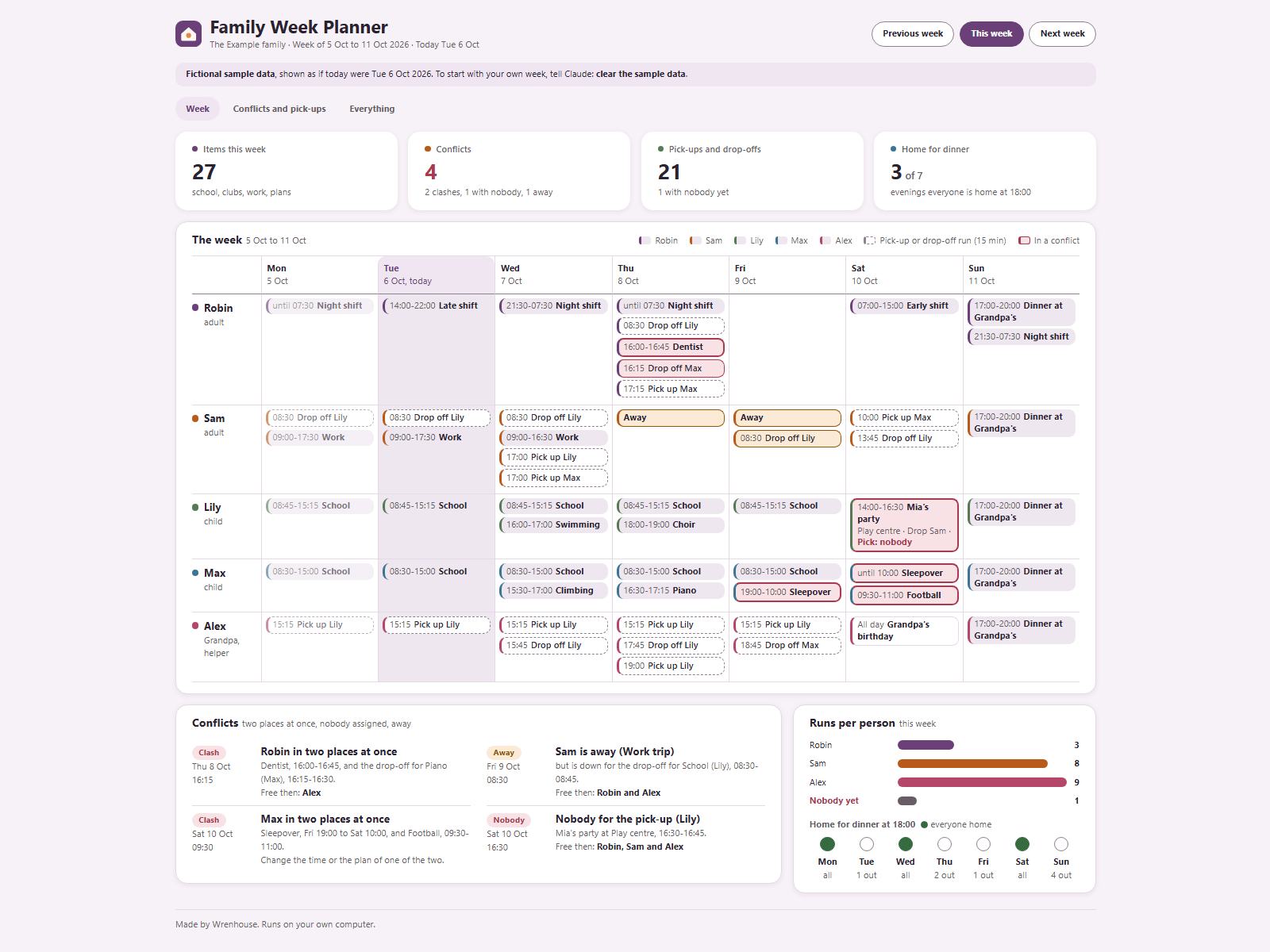
See everyone's week: Family Week Planner
Family Week Planner puts everyone's plans in one week view, per person and per day. It flags clashes: two places at once, or a pick-up with nobody on it. For each open drop-off or pick-up it shows who is free, and it lists who is home for dinner. €4.99, one time.
Who has the kids when: Childcare & Pick-ups
Childcare & Pick-ups gives you a week grid of daycare, grandparents, sitters and school. When a child needs care and nobody is booked, it flags the gap. It adds up hours and costs per carer per month from the rates you enter, and keeps contact notes per carer, only what you type. €4.99, one time.
The school year: School Year Planner
School Year Planner works per child. From your dates it shows terms, holidays and school weeks. It lists what goes in the bag on each school day, tracks homework, tests and deadlines with overdue items flagged, and keeps forms to sign and trip payments still to make. €8.99, one time.
Birthday parties: Kids Party Planner
Kids Party Planner keeps replies and parents' allergy notes word for word. It sets the budget against what you spent, builds a shopping list and goody bags that follow the replies, and gives you a timeline for the day plus a printable invitation. €4.99, one time.
A baby on the way: Pregnancy Companion
Pregnancy Companion works out the week and day, trimester and days to go from your due date. You can ask "Can I eat ...?" and get an answer from a checked UK or US list, with sources. It tracks appointments, nursery and budget, to-dos and the hospital bag, and makes a birth card to print. €12.99, one time.
It is a planning tool, not medical advice. Your midwife or doctor knows your situation.
The first weeks: Newborn Log
Newborn Log lets you log feeds, sleeps and nappies in your own words. Each day shows as a timeline, also across midnight. You can look back over seven days, keep shared notes and collect questions for the next check-up. €4.99, one time.
It is a diary, not medical advice. Worries go to your midwife or doctor.
Two more for the household
From Halden, another maker on Ownkit: Chores Rota shares the chores at home fairly, week by week, and Birthdays & Gifts shows upcoming birthdays and the gift ideas you saved. Both €4.99, one time.
Which kit to start with
| If you want to | Kit | Price |
|---|---|---|
| See the whole family's week and catch clashes | Family Week Planner | €4.99 |
| Plan care across daycare, grandparents and sitters | Childcare & Pick-ups | €4.99 |
| Know what each child needs for school | School Year Planner | €8.99 |
| Run one birthday party | Kids Party Planner | €4.99 |
| Plan a pregnancy week by week | Pregnancy Companion | €12.99 |
| Log a newborn's feeds and sleeps | Newborn Log | €4.99 |
Prices include VAT. One-time payment for the kit.
What you need
- The Claude desktop app with a paid plan. Kits run in its Code tab, and Claude Code is not part of the Free plan (Claude plans, desktop app guide).
- A web browser for the dashboard.
- A free Ownkit account to download.
- For some kits, optionally Node.js, which is free. Without it, Claude applies the same rules by hand.
New to kits? Read how to install a kit. Cooking for the family too? See the kitchen kits.
Sources
- Get started with the desktop app, Claude Code Docs, Anthropic. Read on 5 October 2026.
- Plans and pricing, Claude, Anthropic. Read on 5 October 2026.